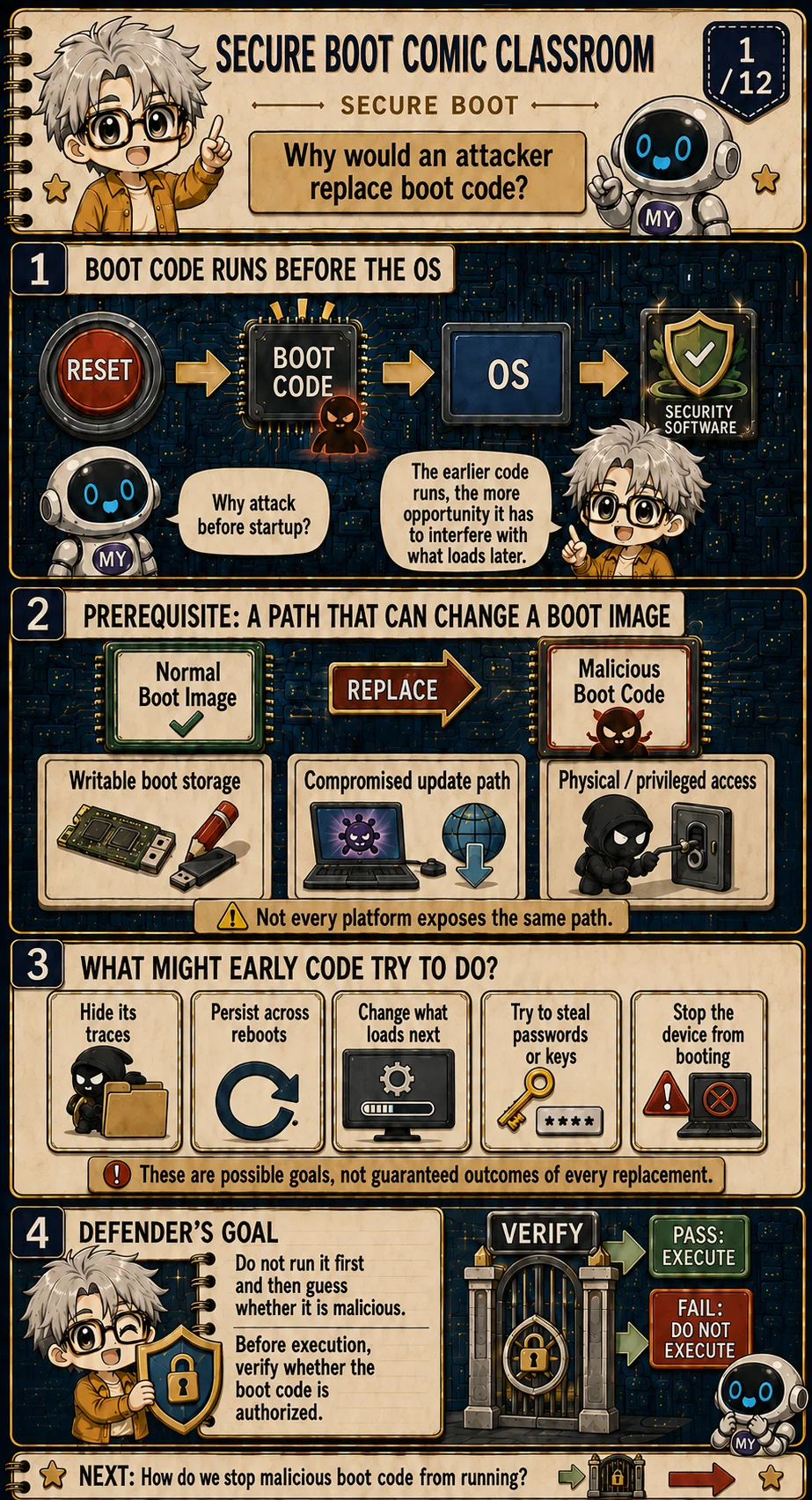
Why an attacker wants the earliest code
The boot path starts at reset, then boot code, then the OS and its security tools. If malicious code can sit in that earliest slot, scanners that wake up with the OS have already missed the first chance to intervene. Earlier execution means more chance to shape what loads later—that is a timing advantage, not a guaranteed win.
Replacement still needs a reachable write path. The plate lists three common ones: writable boot storage, a contaminated update channel, and physical or high-privilege access. Platforms do not expose the same set; a threat model has to ask who can change what before assuming firmware is swappable. [1]
Possible goals include hiding tracks, surviving reboot, rewriting later loaders, waiting for secrets that appear later, or making the device unbootable. Those are goals, not outcomes. The defense is to make the authorization decision at a VERIFY gate before handing over execution, rather than running the image first and judging it afterward.
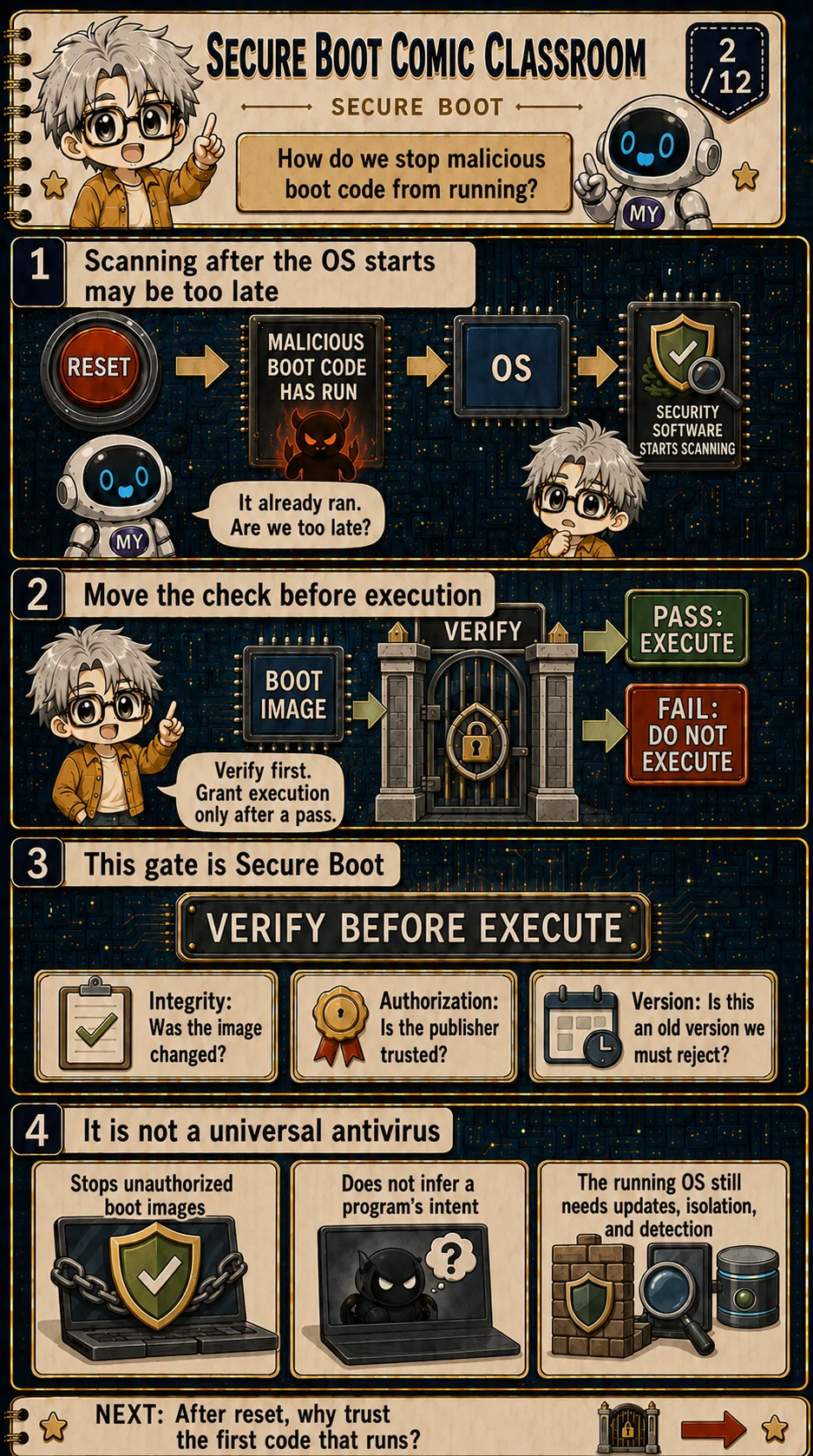
Move the decision before execution
If the order is reset → malicious boot code already running → OS → antivirus starts scanning, half the damage may already be done. The code under inspection may already have influenced the system.
Secure Boot moves the gate earlier: the boot image meets VERIFY first, and only a pass receives execution. That order matches when the attack actually happens. [1]
The gate usually asks three questions—integrity (was the content altered), authorization (did an allowed publisher sign it), and version (is this a policy-forbidden old build). The last panel also draws the boundary: it mainly blocks unauthorized boot images; it does not read program intent; and after the OS is up you still need updates, isolation, and runtime detection. [1]
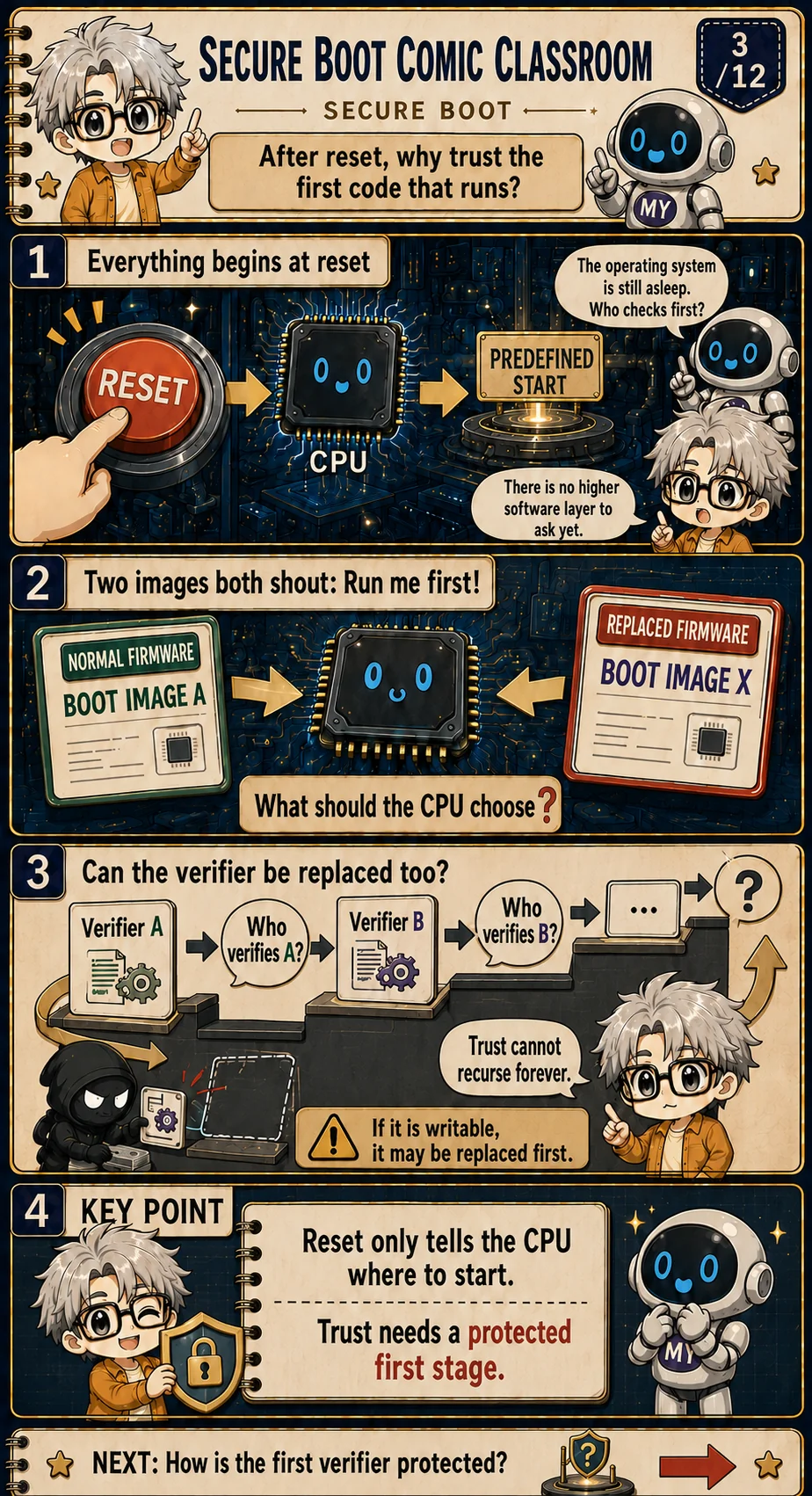
Reset chooses a start, not a trusted winner
Reset sends the CPU to a hardware-defined entry. That answers where execution begins, not why the code found there deserves trust. The OS is not awake yet, and no higher software layer is available to ask.
The plate puts two images side by side—normal Boot Image A and replaced Boot Image X—both claiming to run first. Filename, address, or appearance alone give the CPU no trustworthy basis to choose. OpenTitan's secure-boot design similarly separates the boot ROM from later mutable images. [4]
Stacking another writable verifier does not close the loop: whoever checks verifier A can be replaced too. Trust cannot regress forever through mutable software. Reset only picks a start; trust needs a smallest starting point that is protected first.
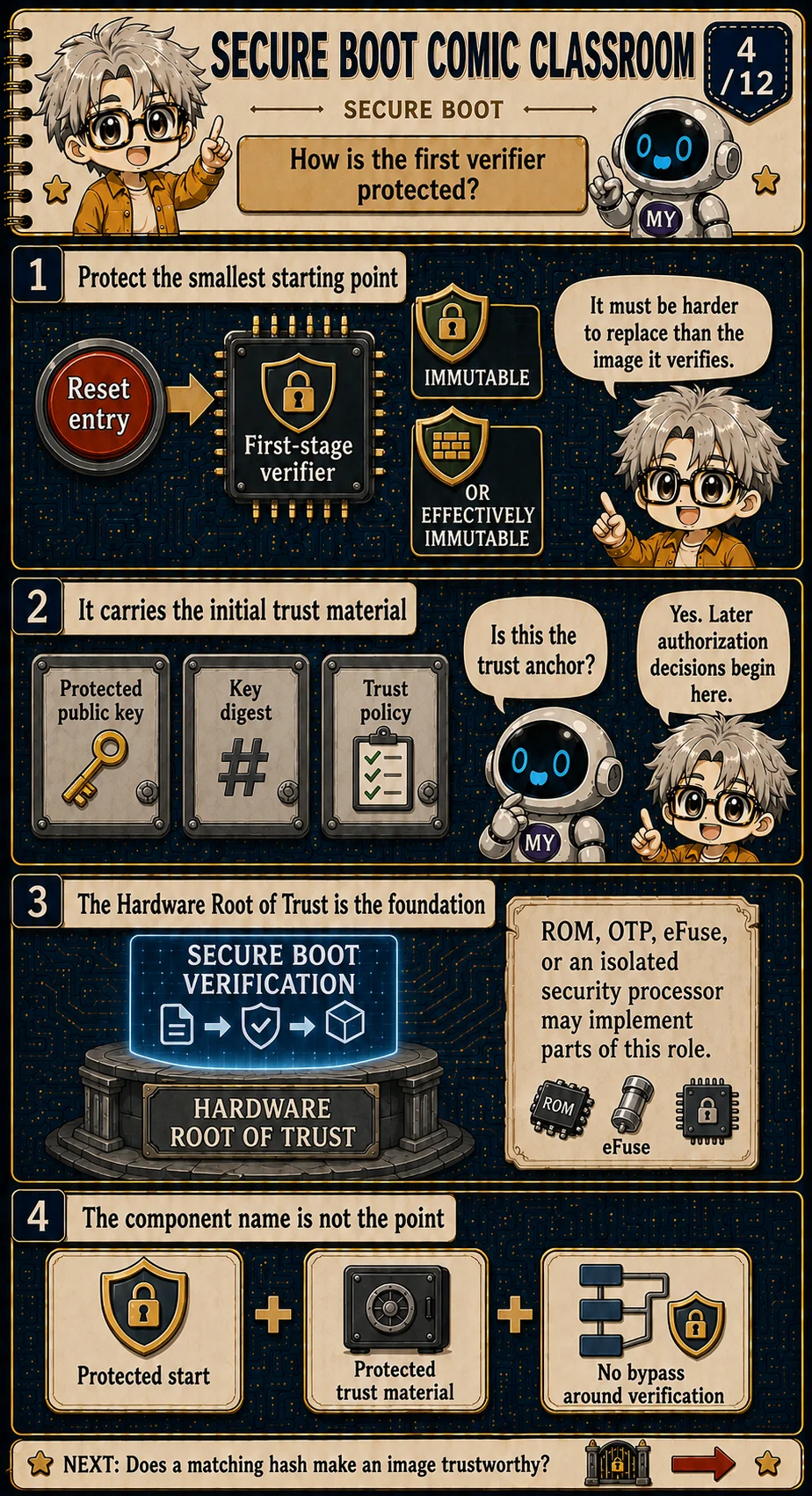
Protect the first verifier and its trust material
The first-stage verifier must be harder to replace than the image it checks. It is commonly immutable, or practically hard to rewrite under the platform's threat model. Whether something is effectively immutable depends on the threat model, not just on the component type. [4]
It also carries the initial trust material—a protected public key, a key digest, or trust policy. Together these form the Trust Anchor later authorization decisions start from. If either the verifier or that material can be swapped arbitrarily, the judgment baseline is gone.
A Hardware Root of Trust is the hardware base for that start, but it is not one fixed part name. ROM, OTP, eFuse, an isolated security processor, or a mix may share the role. What matters is a protected start, protected trust material, and a verification flow that cannot be bypassed. [1][4]
Engineer extension: immutable is a threat-model claim
ROM is a common first-stage implementation, but the architectural requirement is that the attacker in scope cannot modify or bypass the verifier and its trust material. Lifecycle controls, test modes, debug access, and updateable security processors must be included in that judgment.
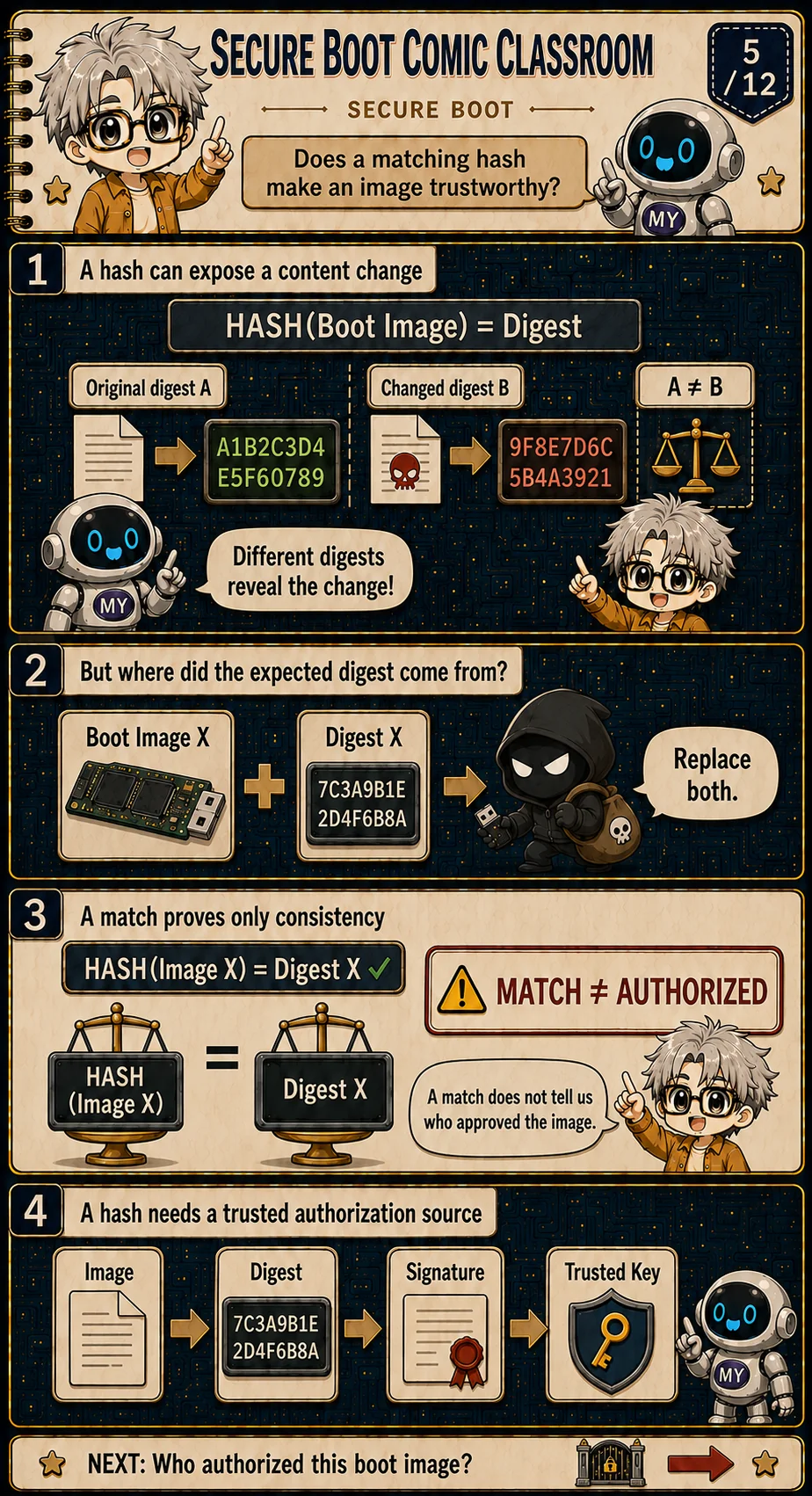
A matching hash is not authorization
A cryptographic hash is good at spotting content change: a normal image and a modified one usually produce different digests. Different means the bytes changed. That is integrity detection.
The hard question is where the expected digest comes from. If an attacker can replace both the boot image and an unprotected expected digest beside it, the new image still matches. The algorithm did not fail; the comparison baseline had no trusted source.
Equality proves only that the two values agree. It does not say who approved the image. The plate's MATCH ≠ AUTHORIZED line is worth keeping. The expected value needs an authenticated channel—commonly a signature checked against protected trust material. [2]
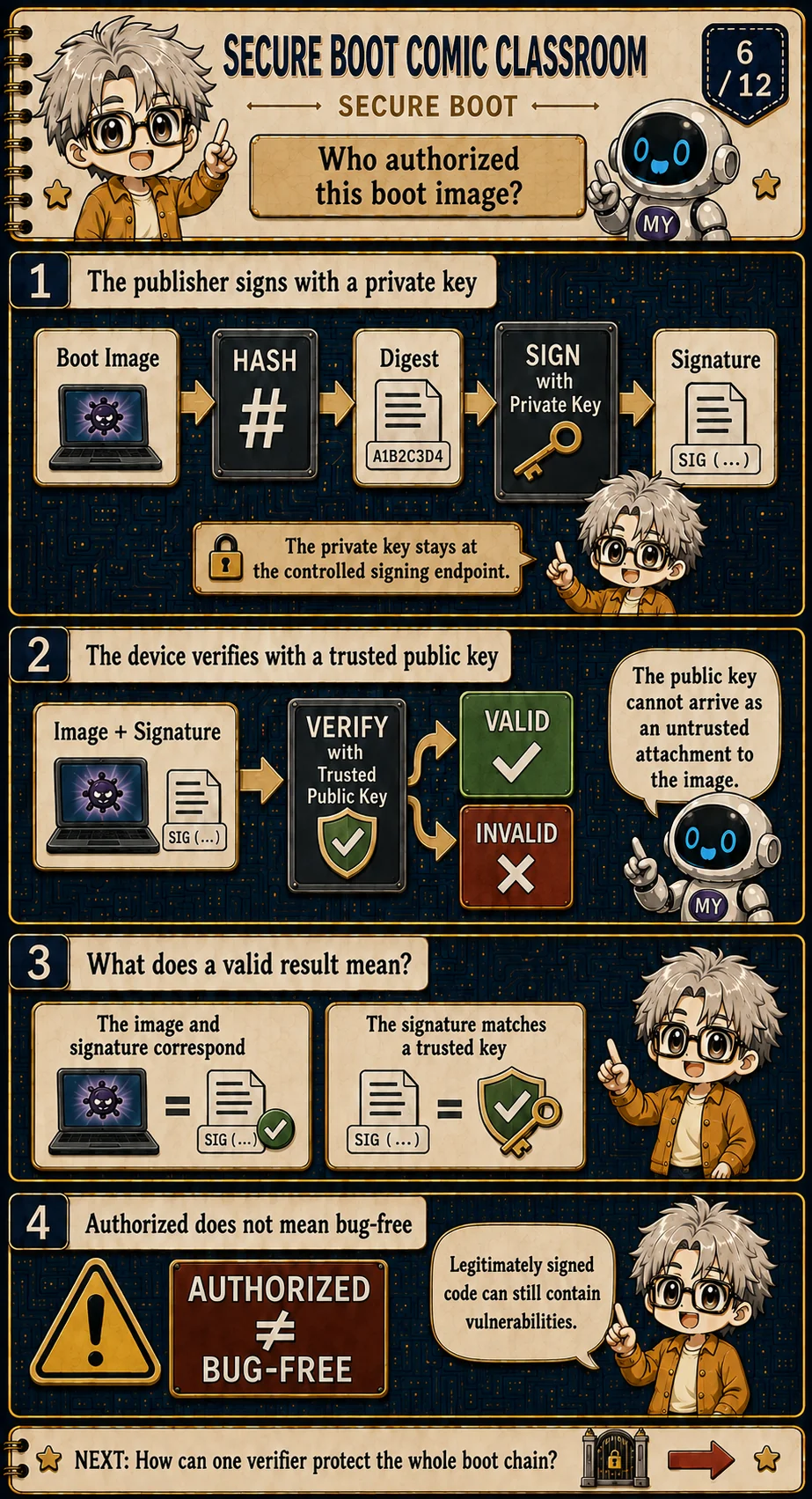
Sign with a private key, verify from a protected anchor
A publisher hashes the image (or a defined signed representation) and signs with a controlled private key. That private key stays on the signing side; it does not travel into the device. [2][6]
The device verifies Image + Signature with a public key already in its trust configuration. A public key delivered alongside an untrusted image does not become trusted simply because the image provides it. The trust anchor has to exist first. The result is VALID or INVALID.
VALID means the content matches the signature and the signature corresponds to a trusted key. It does not mean the program is bug-free. Authorization answers whether this code is allowed to run; software quality still depends on development, testing, and updates. AUTHORIZED ≠ BUG-FREE is the hedge on the plate.
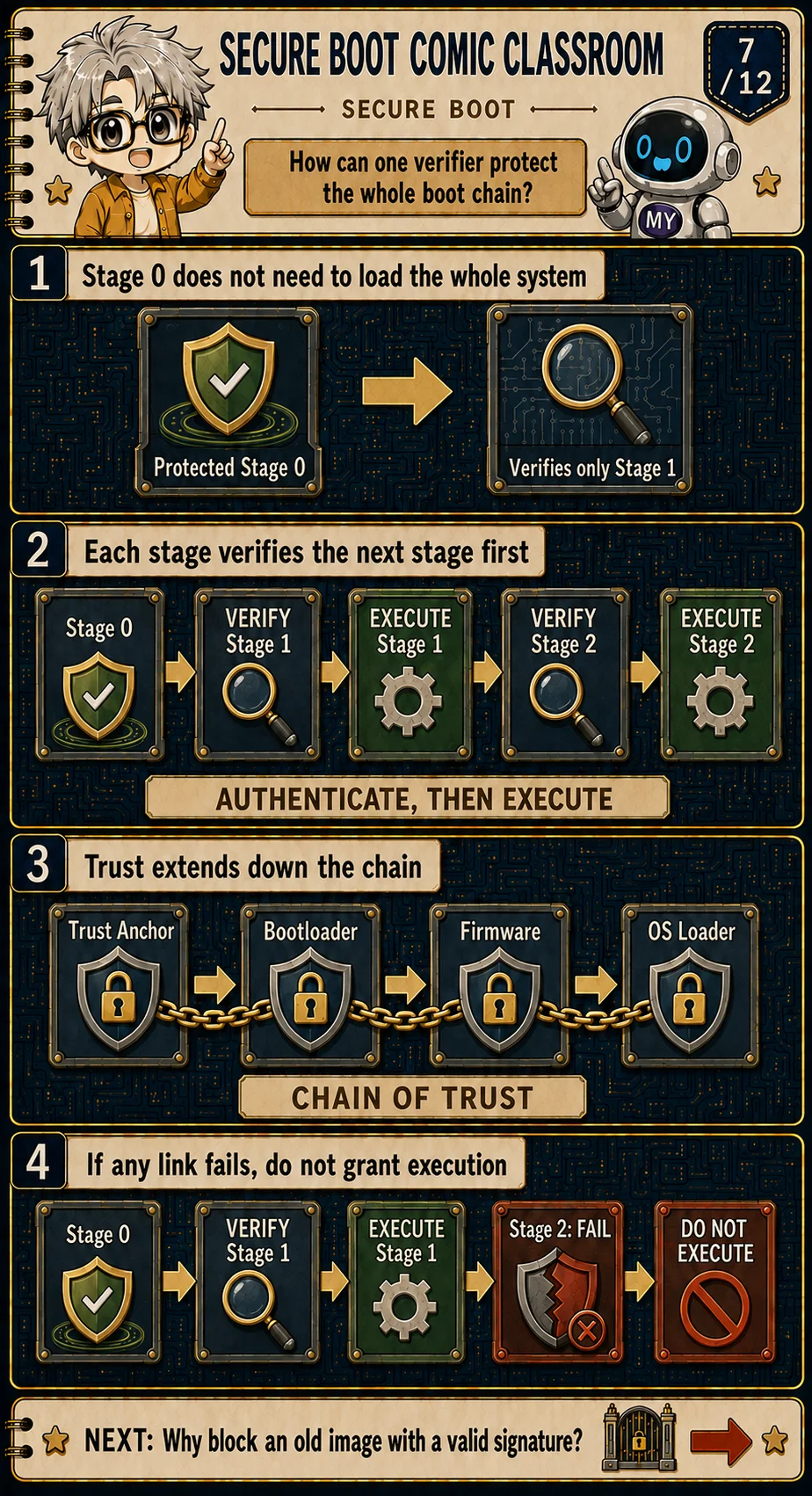
Extend trust one stage at a time
Protected Stage 0 does not need to load the whole system. It verifies Stage 1 and only then executes it; Stage 1 repeats the same order for Stage 2. The plate interleaves VERIFY and EXECUTE under AUTHENTICATE, THEN EXECUTE—the ordering is the security property.
Trust extends down the chain: Trust Anchor → Bootloader → Firmware → OS Loader. Android Verified Boot and the Trusted Firmware-A authentication framework both make that staged handoff concrete. [3][5]
Any failed link must not receive control. Verification has to cover the same object that is about to execute; drawing a row of shields without that order does not help.
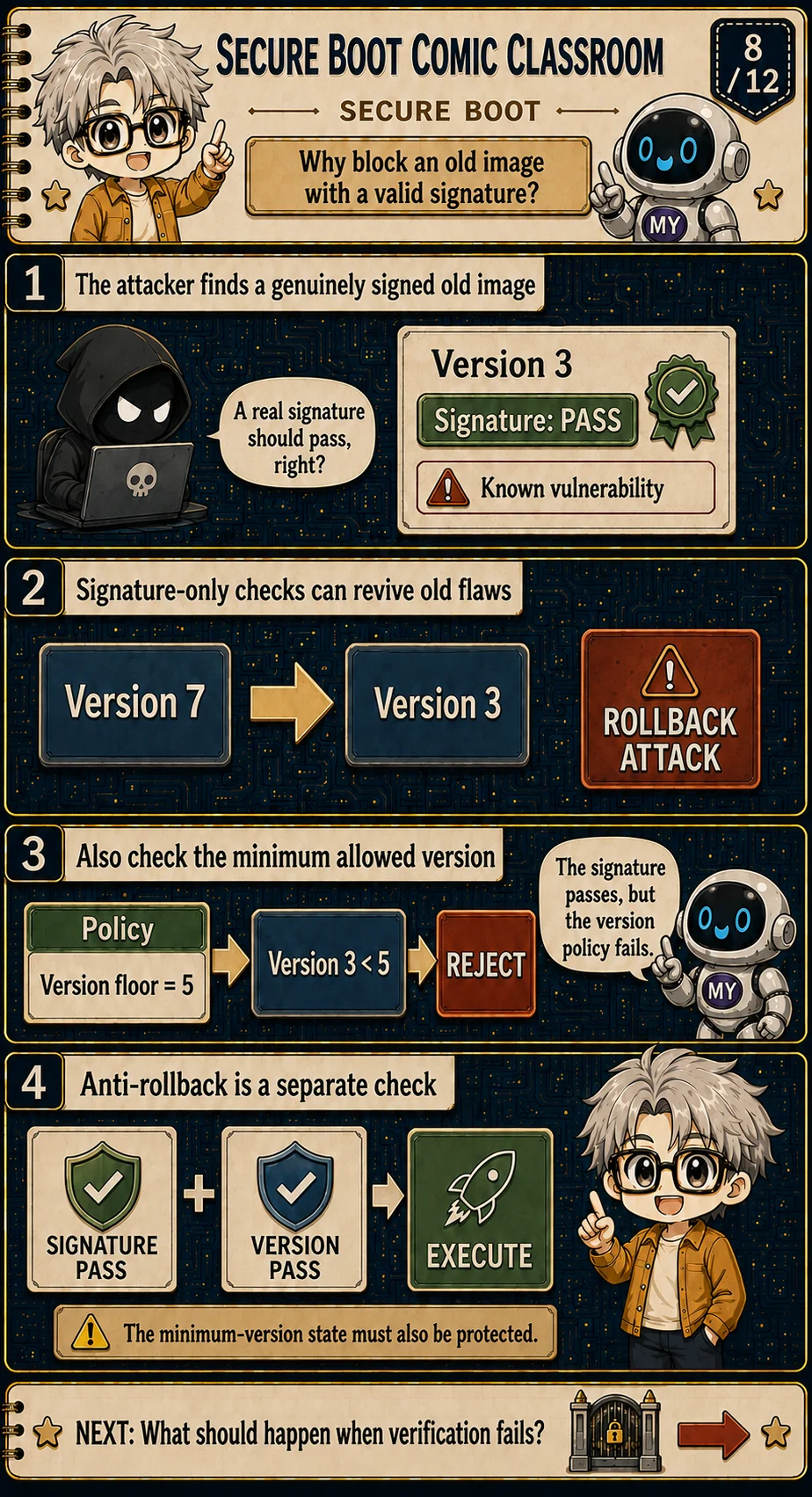
A valid old image can still be disallowed
An attacker can find a genuine old firmware image: the manufacturer signature still shows Signature: PASS, and a later-discovered vulnerability is still present. Authentic is not the same as current, and not the same as still allowed by policy. [3]
If the system only checks signatures, rolling Version 7 back to Version 3 may succeed—the plate labels that a ROLLBACK ATTACK. The old bug is effectively revived.
Anti-rollback adds a separate version decision. With version floor = 5, Version 3 must REJECT even when its signature passes. Execution needs both SIGNATURE PASS and VERSION PASS. The minimum-version state is itself a security asset; if it can roll back with the image, the version check is only a label. [3]
Engineer extension: version state is security state
A version floor stored beside ordinary mutable firmware can be rolled back with the image. Designs use protected counters, fuses, authenticated monotonic state, or equivalent policy mechanisms whose failure behavior and update rules must be analyzed explicitly.
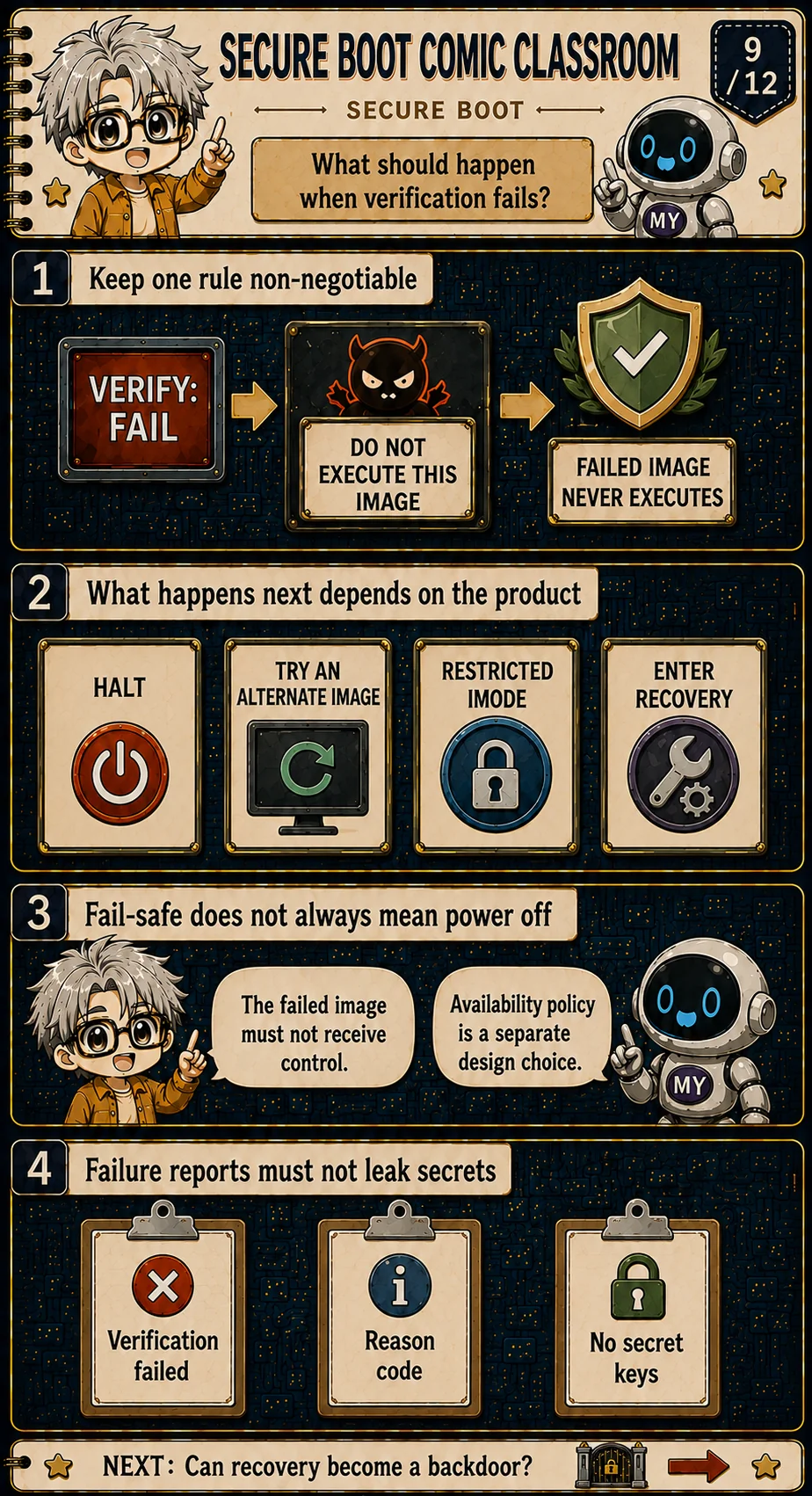
Failure handling preserves the execution boundary
Whatever recovery behavior the product chooses, an image that fails verification must not execute. The plate compresses that into FAILED IMAGE NEVER EXECUTES. [1][3]
What happens next depends on product design—halt, switch to a backup image, enter a restricted mode, or start recovery. The security floor is that the failed image never gains control; availability policy can be designed separately. Fail-safe therefore does not always mean power off; it means the unsafe transition is blocked.
Diagnostics may record verification failure and a reason code. They must not print private keys or other secrets.
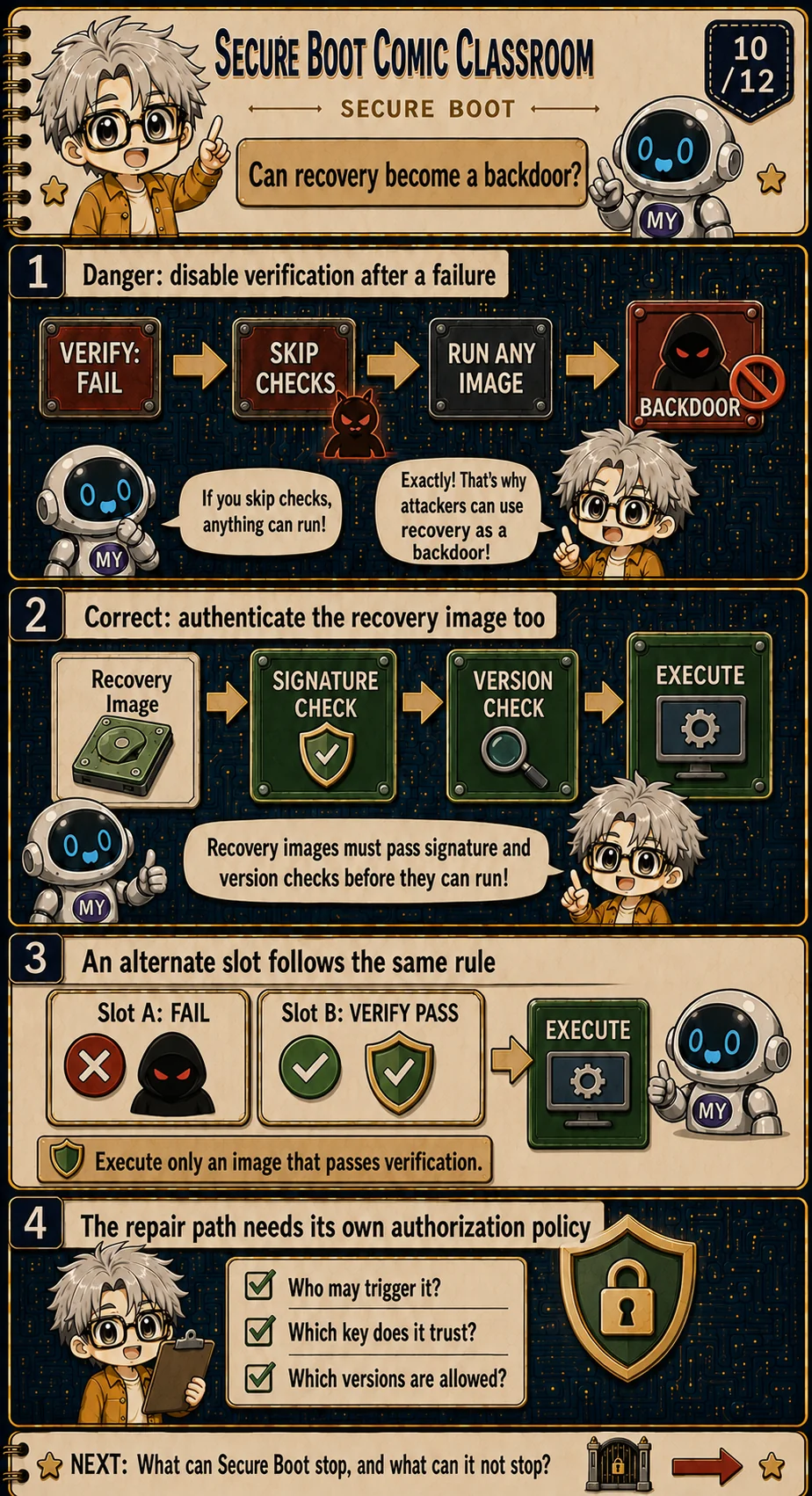
Recovery must obey authentication too
A dangerous pattern is: primary image fails, disable checks, run any recovery image. Manufacture one failure and you have an arbitrary execution path. That is a backdoor, not recovery. NIST's firmware resiliency framing treats recovery as returning to a trustworthy state, not canceling protection. [1][3]
Recovery images still need signature and version checks. Alternate Slot B executes only after its own VERIFY PASS; Slot A failing is not permission to load anything.
The repair entry needs its own authorization policy: who may trigger it, which key it loads, which versions it accepts. It may use a different controlled policy, but it must stay inside the trust boundary.
Engineer extension: recovery is a second boot policy
Recovery may trust a distinct key, accept a restricted image class, or require a physical presence signal. Those are policy choices, but none should turn verification failure into permission to execute arbitrary bytes.
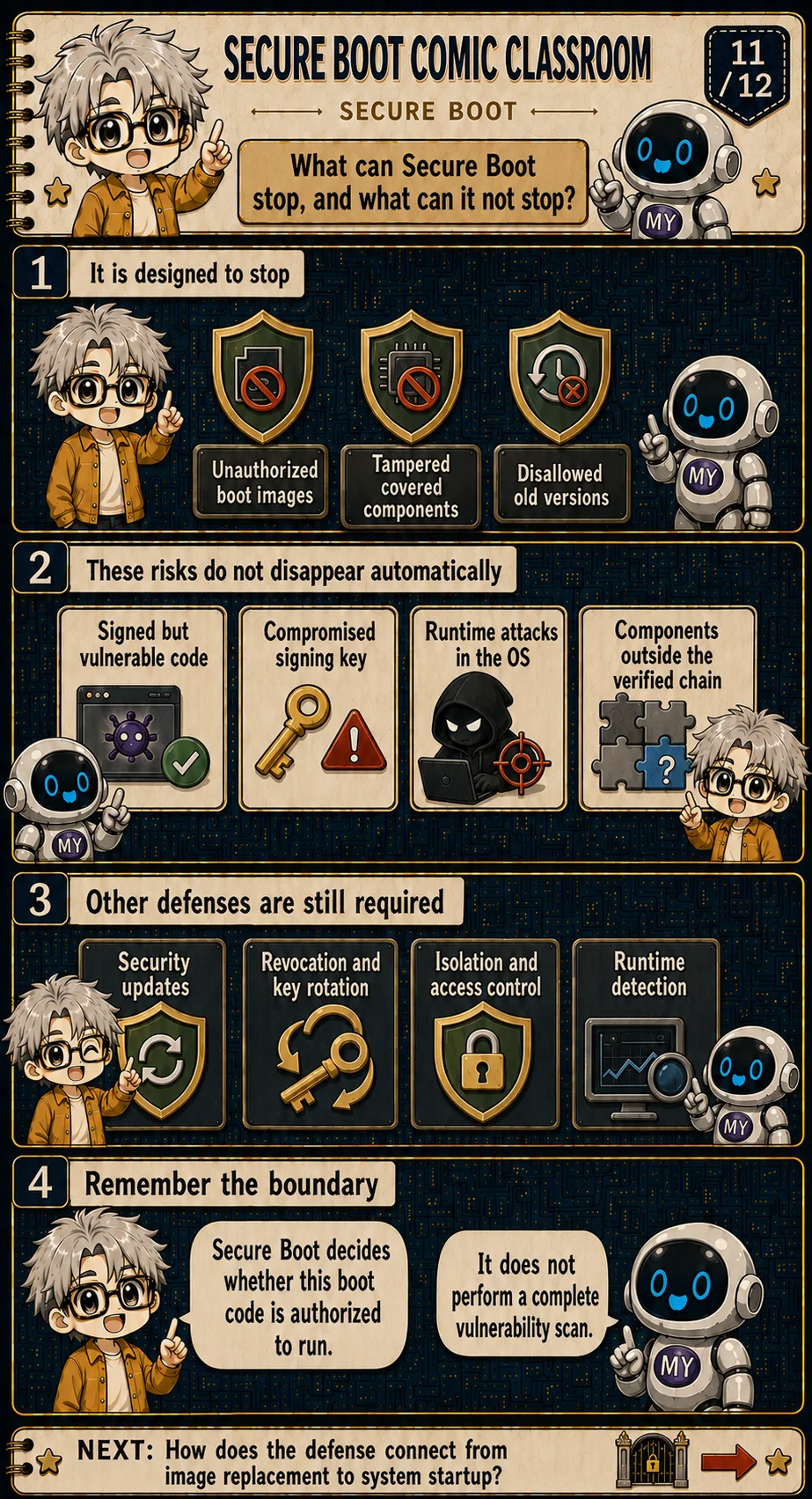
Know what Secure Boot does not solve
It mainly blocks unauthorized boot images, tampered covered components, and old versions forbidden by policy. Coverage stops at components inside the verified chain; anything outside does not become protected just because the product claims Secure Boot support. [1][3]
These do not vanish on their own: signed-but-vulnerable code, a compromised signing key, attacks after the OS is running, and components left out of the chain. That is why updates, revocation and key rotation, isolation and privilege control, and runtime detection still matter.
Secure Boot decides whether a boot program is authorized to run. It does not perform a full vulnerability scan. [1]
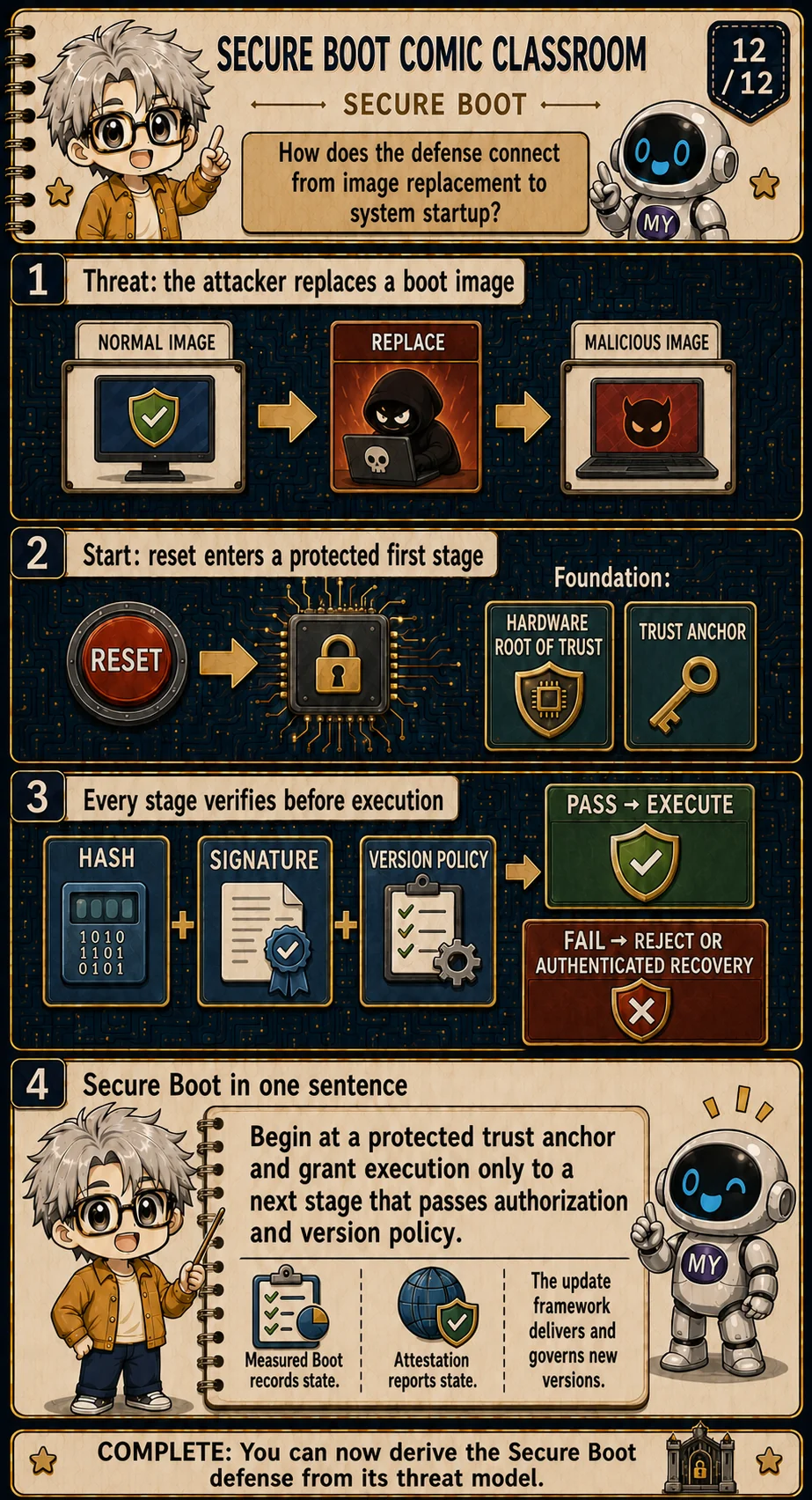
Trace the complete defense from threat to startup
Reconnect the defense to the threat model: an attacker wants to replace the boot image; reset enters a protected first stage built on a Hardware Root of Trust, with trust material at the Trust Anchor. Each covered stage checks hash, signature, and version policy first—PASS executes; FAIL rejects or moves to recovery that must pass equivalent checks. [1][3][5]
The full path follows the same rule: start from a protected trust origin, and hand execution only to the next stage that passes authorization and version policy.
Three neighboring mechanisms answer different questions. Measured Boot records startup state; attestation reports verifiable state evidence outward; an update framework delivers and governs new versions. They can work with Secure Boot without being the same term.
Engineer extension: Secure Boot, Measured Boot, and attestation answer different questions
Secure Boot enforces a local execution decision. Measured Boot records what happened, often in protected registers. Attestation signs or otherwise authenticates selected evidence so a remote verifier can apply its own policy. A design may combine them, but one term should not be used as a synonym for the others.
Five closing lines
- The threat is unauthorized early execution; attacker goals and entry paths depend on the platform.
- Reset chooses a start address. Trust begins only when the first verifier and its trust material are protected.
- A hash detects change; a signature ties authorization to a trusted key; MATCH is still not AUTHORIZED.
- Every covered stage is authenticated before execution, and anti-rollback separately rejects disallowed old versions.
- A failed image never runs; recovery and alternate slots must pass authentication and version policy too.
One path is to compare what Measured Boot and attestation each answer; another is to connect the verified startup state to runtime isolation and update governance. Plates give intuition; threat model and policy set the implementation boundary.
References
- NIST SP 800-193, Platform Firmware Resiliency Guidelines: Protection, detection, and recovery principles for platform firmware.
- NIST FIPS 186-5, Digital Signature Standard: Digital-signature generation and verification foundations.
- Android Verified Boot: Chain-of-trust, verification, rollback protection, and boot-state behavior.
- OpenTitan Secure Boot: A concrete silicon-rooted secure-boot design and its lifecycle assumptions.
- Trusted Firmware-A Authentication Framework: A chain-of-trust authentication framework for firmware images.
- Microsoft Secure Boot overview: UEFI Secure Boot keys, allowed and forbidden images, and deployment guidance.
Valid signature, old version: may it execute?
Version 7 passes floor 5. Set the version to 3 or the floor to 8 while keeping a valid signature. Then separately alter image bytes and the verification anchor and inspect why execution is rejected.
ECDSA P-256 / SHA-256 signs and verifies a custom JSON manifest binding target, version and image SHA-256. Modeled execution uses the verified byte snapshot and runs no code. Anchor and floor protection, parsing, fault resistance and the actual verification-to-execution handoff remain system responsibilities. Success does not establish freedom from vulnerabilities.
Learning guide
How Trust Is Built Inside a Chip
Open the course outline → · Progress counts published lessons only
Prerequisites
- No prior boot-security knowledge required; Digital Signature and HRoT are helpful background
What I learned
- Derive the Secure Boot control from the attacker's early-execution advantage
- Explain why reset is not trust and why the first verifier needs protected trust material
- Separate hash consistency, signature authorization, and anti-rollback version policy
- Trace authenticate-then-execute through the complete chain of trust
- Design failure and recovery paths without giving a failed image control